• Welcome to H4O! For a reduced ad experience, please login or register with the forum.

Battery light on?

adventr

Well-Known Member
Messages
500
Location
United States
2009 H3 with 5.3 V8.

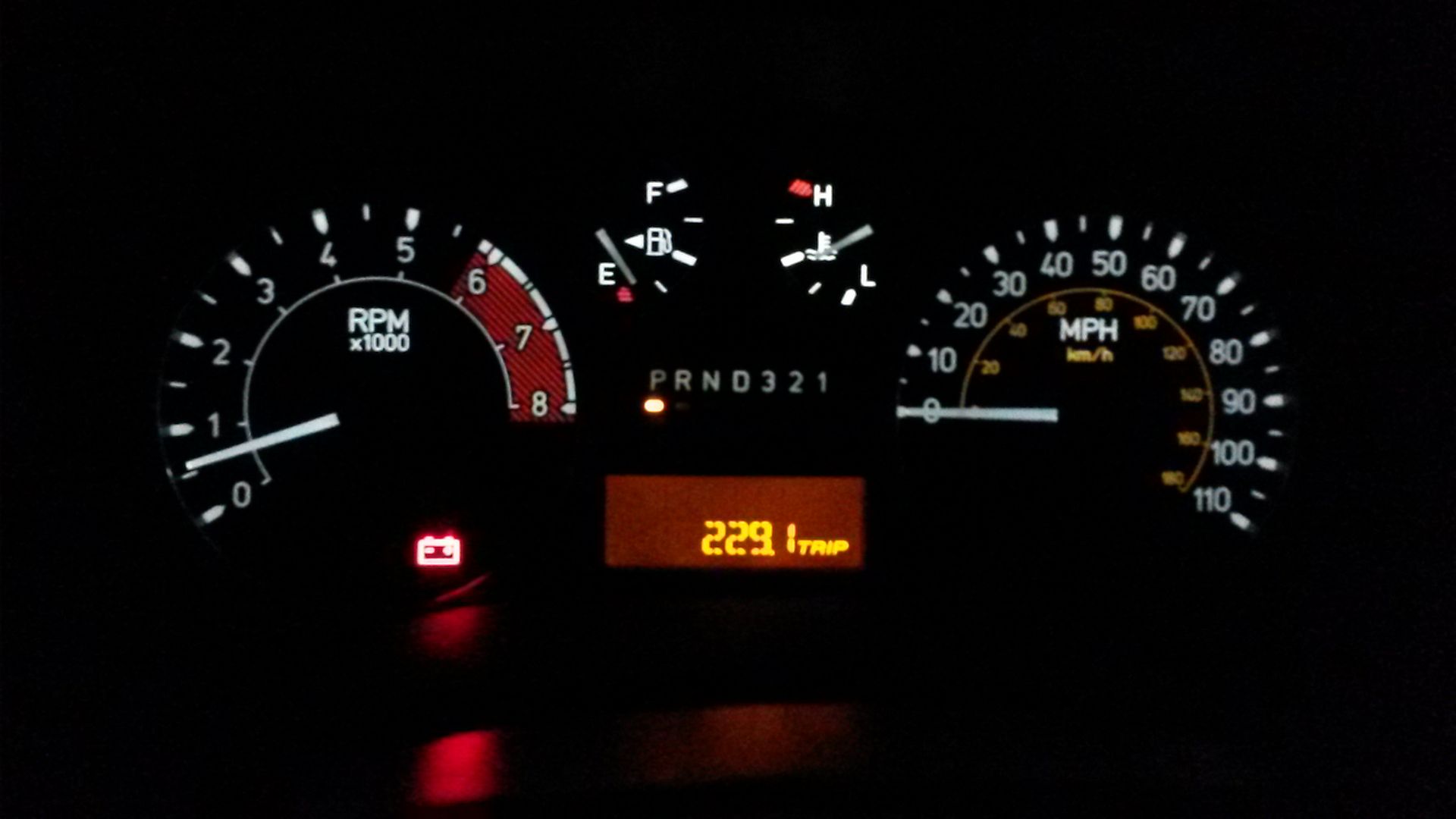
Went to drive this evening and noticed that the battery icon on the gauge panel was lit. Used multimeter to check things out, and found the following:

Engine off battery voltage: 12.78
Engine off with all lights on: 12.25
Engine on with all lights on: 13.79

Used the load test function on my multimeter and it said battery was good. Checked over the terminals, all were tight and no corrosion.
Also, to rule out terminals, I verified voltages at several different locations and grounds. All were within 0.05v of each other and at the battery.

So what could be the issue? No other symptoms other than the light staying on. You can hear alternator pull load on the engine when you roll up all windows at the same time, so seems to be working properly. Engine starts up fast.

Here is a pic of what I've got. Nothing shown about battery or voltage in the DIC. Just this light.

[FONT=Verdana, Arial, Tahoma, Calibri, Geneva, sans-serif] [/FONT]
 

Reloader

Well-Known Member
Messages
413
Location
Montana a free state
I had this problem about 20 miles after resealing the oil pan gasket on my 08 Alpha. I discovered after throwing a new alternator at the problem, that the sensor on the negative cable for the generator control module had come disconnected. The charging system still works but batt lite will be on and may have a service charge system in DIC.
I figure that I loosened it when I disconnected the neg cable . My old alternator still is working but had a bearing starting to get noisey so I left the new alt in place . Only paid $212 at local dealer for a new AC Delco one not a reman. Old one is a good spare now.
The lite went off when I plugged connector back in but had to use a TEC 2 to clear code from gen control module.
Other high end scan tools such as a snapon or other may be able to access the module.
 

4speedfunk

Well-Known Member
Messages
4,250
Location
Tardville
Yeah...I think this light is actually an "alternator" (non-charging) light. If it appears, I would look at the alternator first. I have seen many H3's with dead or dying batteries, and this light has never illuminated on any of them. This leads me to believe that there is no actual indicator of battery condition. But rather only if the alternator is putting out the correct voltage or not.
 

adventr

Well-Known Member
Messages
500
Location
United States
Thanks for the replies, guys. I went out again this morning and found that generator control module that's located behind the battery (it clamps around the negative battery cables). Check it out and made sure connector was plugged in good.

Measured battery voltage this morning before starting the truck (after it had sat all night), and it was 12.5v. Fired right up, and checked voltage with engine running, and it was 13.84v.

Battery light is still on, with no indications of any issues (to me at least). Went ahead and drove it to the office today, and light remained on the entire trip. Never any chimes or messages in the message center though.

I'm certainly not opposed to replacing the battery and alternator today, just not sure if either of those would actually fix the issue.

Is it possible for that generator control module to go bad? Maybe a way to test it with a multimeter?
 

adventr

Well-Known Member
Messages
500
Location
United States
Ok, doing some digging on this little module. I tend to obsess over things like this until I can figure them out... LOL

Not much info out there about them in the H3 application, but in the chevy truck world (same 5.3 engine) there is a lot of discussion. Apparently they were a common failure item, and would cause the exact same problem as I'm having.

Their main purpose is to monitor battery condition, and switch off the alternator at certain times to conserve energy (increase MPGs).


Some quotes that I've found:


I swapped out the sensor unit I mentioned. It has a superseded part number, which interestingly feels quite a bit heavier than the one I took off. In the swapping process the whole negative cable has to be removed to slide it on, so it's possible that grounds got extra clean in the swap process (but they didn't look bad at all), and may have to do with some of the improvement, but it starts WAY stronger and peppier now, and the light has been off for 5 days now (probably 60 starts). I'm pretty sure this is a done deal now.


For those wishing to keep and maintain the GBCM PCM programming and GBCM function for your '05 5.3L Vortec (Non-Hybrid) engine application, this may help. It may be applicable to other year and CID models too.

The GBCM was put in place to control the alternator charging behavior to improve engine fuel economy, performance and cut down on wear & tear of the alternator. The fact it is still an OEM feature says a little about the validity of purpose. I've read plenty "How to Delete" posts but none with the basic information about how to "Keep" and connect the GBCU wiring. After a good deal of research through wiring diagrams in AllData, here's what I've learned.

The GBCU Connector has 10 Pins.

Pin's A & C (Red/White) (Circuit 4740) are both positive battery voltage supply wires; 10 amp fused battery feeds to the GBCM.

Pin B (Gray) (Circuit 23) is the Generator Field Duty Cycle Control wire; connects to the OEM alternator plug; one of two wires. This wire is also spliced / tied to the PCM Green connector Pin #75; the Generator Field Duty Cycle Signal. In short, there is no need to alter these connections in the OEM harness.

Pin D (Brown) (Circuit 25) is the Charge Indicator Control wire; connects to the OEM alternator plug; the second of two wires. There is no need to alter this connection in the OEM harness.

Pin E is not used; a cavity.

Pin's F & H (Black/White) (Circuit 451) are both Ground wires; connect to the OEM harness ground Splice Pack and ultimately are grounded to the engine block. There is no need to alter this connection in the OEM harness.

Pin G (Dark Blue) (Circuit 5668) is the "Engine On" signal for the Power Brake Supplemental Brake Assist (SBA) Pump Motor. The SBA unit uses this wire to determine if the engine is running so it can run its initial start-up diagnostic features. For more info on the SBA pump and its operation, Google it. Otherwise this circuit is not needed for the GBCM operation and can be properly stowed or removed if the Supplemental Brake Assist System is not part of your application.

Pin J (Purple) (Circuit 5428) is the Generator Regulator Control wire. Connects to the PCM Green connector Pin #15. There is no need to alter this connection in the OEM harness.

Pin K (Orange/Black) (Circuit 6752) is the Class 2 Serial Data wire. Connects to the main splice pack (SP205) for Pin 2 of the OBD2 Data Link Connector. There are numerous OEM Class 2 Serial Data wires from various vehicle modules that connect to the OBD2 main serial data wire. There are also some that do not; like PCM Blue connector Pin 59.

I hope everyone finds this information helpful.
 

adventr

Well-Known Member
Messages
500
Location
United States
When the battery light came on for me it was my alternator


Sent from my iPhone using Tapatalk


Can you elaborate a little more on this?

Was it only your battery light that was on, or was there also a message in the display center? Did you test your alternator with a multimeter, and if so, what were the readings?

Thanks!
 

poweraidon

Well-Known Member
Messages
830
Location
georgia
Can you elaborate a little more on this?

Was it only your battery light that was on, or was there also a message in the display center? Did you test your alternator with a multimeter, and if so, what were the readings?

Thanks!

It was only my battery light but all my electronics were dim like my lights dash and my windows rolled up and down really slow. I also jumped my battery but it died right after. I also put a new battery in and it died the next day


Sent from my iPhone using Tapatalk
 

adventr

Well-Known Member
Messages
500
Location
United States
It was only my battery light but all my electronics were dim like my lights dash and my windows rolled up and down really slow. I also jumped my battery but it died right after. I also put a new battery in and it died the next day


Sent from my iPhone using Tapatalk


Ok, gotcha. Thanks

Mine has no other symptoms, and my alternator is putting out the correct voltage, so I really think it may just be that module.
 

adventr

Well-Known Member
Messages
500
Location
United States
Looks like the problem may be fixed.

Went out today, and was preparing to completely remove the battery. Disconnected the terminals, removed the battery cover, checked the #7 and #32 fuses.
I re-seated the electrical connection to the Generator Module. Upon closer review of the battery terminals, there was a little white residue on the inside where they contact the battery post. I took some wire brushes and a small round file and cleaned up the terminals. Then took a scotch brite pad to the battery posts as well as the terminals.
After all of that, I put everything back together and started it up. Battery light was off.
Checked voltage at battery, and this time I got 14.5v. Was able to verify that measurement at the alternator as well.

So..... one of those few things that I did seems to have fixed the issue with the battery light. None of the electrical plugs felt loose, or even like they had ever been disconnected before, so I doubt that was it. Most likely, is that the Generator Module is extremely sensitive to terminal corrosion! Even though I didn't notice any last night when looking at the terminals, it was still there.

I'll give it a few days, then update again. Thanks for the help everyone!
 

napalmsticks

Well-Known Member
Messages
144
Location
NM
Isn't 13.8V low for an alternator? Could be sensing your alternator is becoming weak I would assume.

ETA: Nevermind, I see you fixed it... :thumbs:
 
Top