• Welcome to H4O! For a reduced ad experience, please login or register with the forum.

What do you think? 6.1in or 7in in dash dvd/nav/hd radio?

Ghostbuster

Well-Known Member
Messages
862
Location
United States
I can't decide. I also can't decide if I need a unit with navigation or not.
If any of you guys have pictures of your aftermarket setups please post them up.
Any advice is appreciated.

6.1 inch
74701486.jpg


7 inch
Hummer-h3-car-cinema-navigation-kenwood-dnx8220bt-kalogeropoulos.jpg
 

Ghostbuster

Well-Known Member
Messages
862
Location
United States
7 inch. My buddy just put one in his h3, it is awesome!
Nav or no Nav? I don't really travel much, and I can use my cell phone's maps to find my way around if needed. But I've seen some units with built in Garmin maps that seem really nice and convenient.
 
S

SedonaBound

Guest
I have a factory 6+" in-dash GPS in my Cayenne and a dedicated 3.5" GPS mounted above the binnacle on its suction cup mount in my H3T. I prefer the dedicated unit for several reasons:
1. I can see it much better than the low mounted screen in the head unit, which is also too far away to read map text or try to adjust safely while driving.
2. At a given time, in-dash units tend to be a generation or more behind dedicated units in their technology. I can replace my dedicated unit when technology improves for under $200; I'm unlikely to ever pay the cost to upgrade an in-dash unit.
3. You can shop a superb dedicated unit for under $200 with lifetime map updates and traffic coverage. Most in-dash units rarely go on sale and they often charge for updates; it can be expensive.
4. There are hundreds of dedicated units on the market...one probably has exactly the features and display you want. In-dash units are compromises and limited in how you can tailor the display and route info.
6. Several dedicated units can display topo maps that are very useful offroad. I haven't seen any in-dash unit that does this (but may be wrong about this).
7. I can connect a dedicated unit to my computer via USB and easily program waypoints and routes instead of sitting in the truck fiddling with cumbersome menus and controls.
8. I think screen size for GPS is secondary if you have a unit that allows tailoring of the display. I get more useful info on the 3.5" screen of my Lowrance XOG that the 7" screen in the Porsche.
 

humvee

Well-Known Member
Messages
507
Location
Doha, Qatar
Whatever you decide, here's the latest lineup from Pioneer! They will start supporting Apple Carplay this month, and already support most android and Apple apps.
Including Google maps straight from your phone, which I find to be better than all other nav setups.

If you find it a bit pricey, search for Pioneer AppRadio models, they also allow phone connectivity and app integration, including Google Maps.

Hope this was helpful.


  • AVIC-8000NEX
  • small-unit-2.png
    AVIC-7000NEX
  • small-unit-3.png
    AVIC-6000NEX
  • small-unit-4.png
    AVIC-5000NEX
  • small-unit-5.png
    AVH-4000NEX
 

rsm688

Well-Known Member
Messages
234
Location
mississippi
Go with a 7" Kenwood (or JVC), I just had my aunt order me one with no nav as I don't use it enough and when I do I've got my phone and a garmin. My aunt owns one of the largest electronic repair companies that does warranty work for many of the big name companies in the industry, she said that Pioneer has gone to crap over the last few years and that Kenwood is by far the way to go nowadays
 

rsm688

Well-Known Member
Messages
234
Location
mississippi
Good choice, chances are my aunt's company is the one that refurbished it. They do the majority of them and majority of the warranty repair work for Kenwood
 
Messages
1,248
Location
New Jersey
I just recently installed a Pioneer double din head unit with Nav, back up camera, and dozens of other features, and it's amazing! But honestly, now a days, all these radios come with so many features, it's hard to decide which one is best, that's why I let my buddy that owns an audio shop decide what was best for me, and I am very satisfied. Good luck with your new radio Ghostbuster!
 

Ghostbuster

Well-Known Member
Messages
862
Location
United States
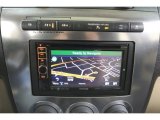
I got it installed yesterday. Everything works as expected... But in bluetooth mode with my cell phone, the rear speakers don't work. In Cd, radio, and usb drive mode, all the speakers work. I emailed Kenwood to see whats up.

Sorry for the crappy pictures, my HTC One M7 doesn't like to focus. I even took it to the ATT store today and they messed with it for 30 minutes and couldn't figure it out. They told just wait and trade it in lol.

IMAG0962_zps1bfd3008.jpg

IMAG0965_zpsc4e7a847.jpg
 
S

SedonaBound

Guest
Report back using on the controls while driving. They look pretty tiny and may be hard to hit with a fingertip without taking your eyes off the road.
 

Ghostbuster

Well-Known Member
Messages
862
Location
United States
The main screen is fine, but if you go into the settings mode while driving... Not the smartest thing to do. I fixed the rear speaker issue. It was just a default setting on the unit for them to only play in the front.

I loaded up a usb with some music on it and it works, but it is pretty slow at switching songs...

It did change the sound quality a bit.
I might upgrade to the monsoon speakers. I''ve figured out that oem speakers have way more bass than most aftermarket ones.
But then I might just go complete aftermarket and add a sub.. I'm not sure.

But overall I'm pleased.
 
Top